
Best Budget App Without a Subscription or Bank Login
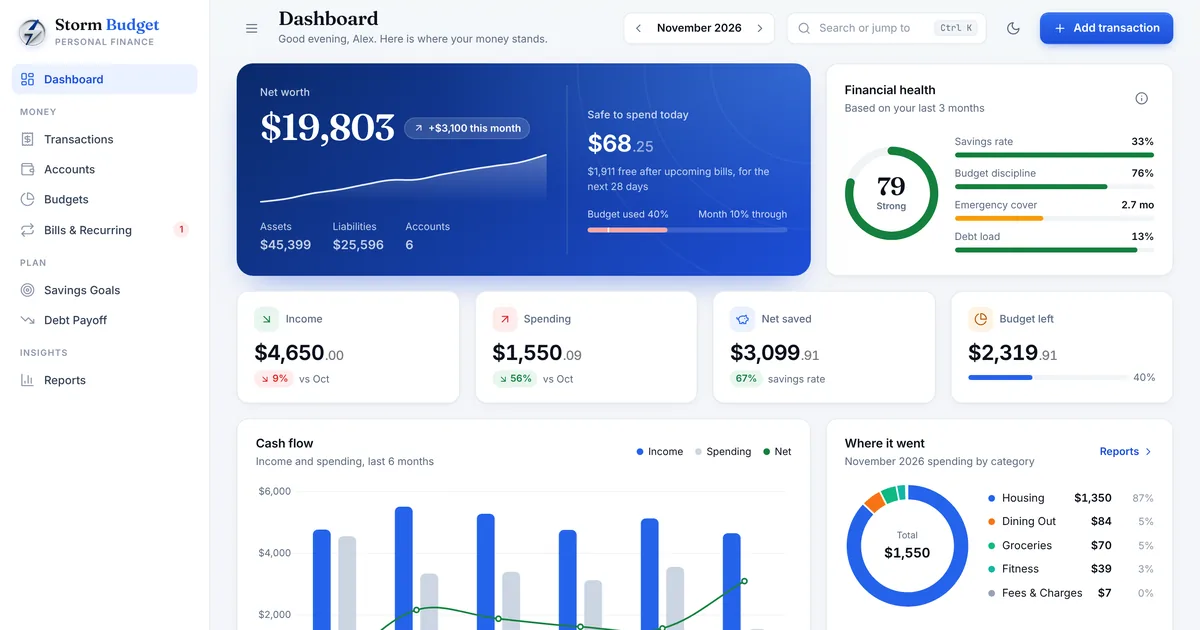
Popular budgeting apps commonly charge around $95 to $109 a year, and most ask you to connect your bank account. For a lot of people that is two problems: another subscription to cancel, and financial data uploaded to a company they have never heard of. The good news is that the features that actually change your finances do not need a bank connection at all. This guide covers what to look for in a budget app without a subscription, and how to set up a budget you will still be using in six months.
Why people are leaving subscription budget apps
Budget apps sell themselves on saving you money, then charge you every year. Prices tend to rise, free tiers get trimmed, and when you stop paying your history often goes with it. Bank connections also break regularly, which means fixing sync errors instead of budgeting.
There is also privacy. Linking your bank gives an app a detailed picture of where you shop, what you earn and what you owe. Many people are comfortable with that. Plenty are not, and for them a private, offline budget is the better fit.
The features that matter
A budget app earns its place by answering three questions quickly: how much can I safely spend, where did my money go, and am I getting closer to my goals. Everything else is decoration.
- Monthly budgets per category, with rollovers for unspent money
- Fast entry: adding a transaction should take seconds
- Bills and subscriptions with due dates and overdue alerts
- Savings goals that tell you what to save each month
- A debt payoff plan with a debt-free date
- Reports: income versus spending, savings rate and spending by category
- CSV import, so you can bring in a bank statement without a bank login
Zero based budgeting in plain words
Zero based budgeting means giving every dollar of income a job before the month starts. If you earn $4,000, you assign all $4,000 across rent, groceries, bills, savings and debt until nothing is left unassigned. You are not spending it all; savings and extra debt payments are jobs too.
The benefit is that overspending in one category forces a visible decision: move money from somewhere else, or accept that a goal slips. A good budget app shows how much is left to assign and warns you before a category goes over.
Manual entry is a feature, not a bug
It sounds like more work, but entering transactions yourself is one of the most effective budgeting habits there is. Each entry is a small moment of awareness. People who log spending manually tend to notice patterns, like how often small takeaway orders add up, that automatic imports hide.
Speed is what makes it sustainable. Look for an app that remembers payees and picks the category for you, supports splitting one receipt across categories, and lets you import a CSV statement at the end of the month to catch anything you missed.
How to set up a budget that lasts
Start with last month, not an ideal month. List your income, then your fixed bills, then your everyday spending categories. Set each category to what you actually spent, then trim two or three of them slightly. A budget built on wishful numbers is abandoned by week two.
Add your bills and subscriptions with their due dates so the app can tell you what is safe to spend today. Then add one savings goal, such as a starter emergency fund, and one debt if you have one. Review once a week for ten minutes. That weekly check is where budgets succeed or fail.
Offline and private: what to check before you buy
If you choose an offline budget app, check three things. First, where the data is stored: it should stay on your device and nothing should be uploaded. Second, backups: you need a simple way to back up and restore, because there is no cloud copy. Third, devices: offline apps usually do not sync between phone and computer, so pick the device you will budget on.
Storm Budget is built this way: an offline budget planner with budgets, bills, goals, debt payoff and reports for $49 once.
Mistakes that break a budget
Most budgets fail for the same few reasons. The good news is that each one has a simple fix.
- Budgeting from an ideal month instead of a real one: start from last month's actual spending
- Forgetting irregular bills like insurance or car registration: divide them by twelve and set the money aside monthly
- No buffer: a small miscellaneous category absorbs surprises without wrecking the plan
- Giving up after one bad month: adjust the categories and keep going
Common questions
Is manual budgeting really worth it? For most people, yes. Entering transactions yourself takes a few minutes a week and keeps you aware of where money goes, which is the whole point of a budget.
Can I still import my bank statement? Yes. Most banks let you download a CSV statement, which you can import without ever giving an app your bank login.
What if I share finances with a partner? Agree on the categories together and review the budget once a week. An offline app works best on one shared computer.
The bottom line
You do not need a bank connection or a yearly subscription to budget well. You need fast entry, clear categories, bills you can see coming and a weekly habit. Pick an app that does those things well, keeps your data private and costs the same next year as it does today.
If debt is the main thing you are tackling, read debt snowball vs avalanche next.
Groceries are usually the easiest category to cut. Our guide to meal planning on a budget shows how.
You may also like: Storm Debt Planner, Storm Meal Planner, Storm Rentals