
Rent Roll Spreadsheet vs Landlord Software: When to Switch
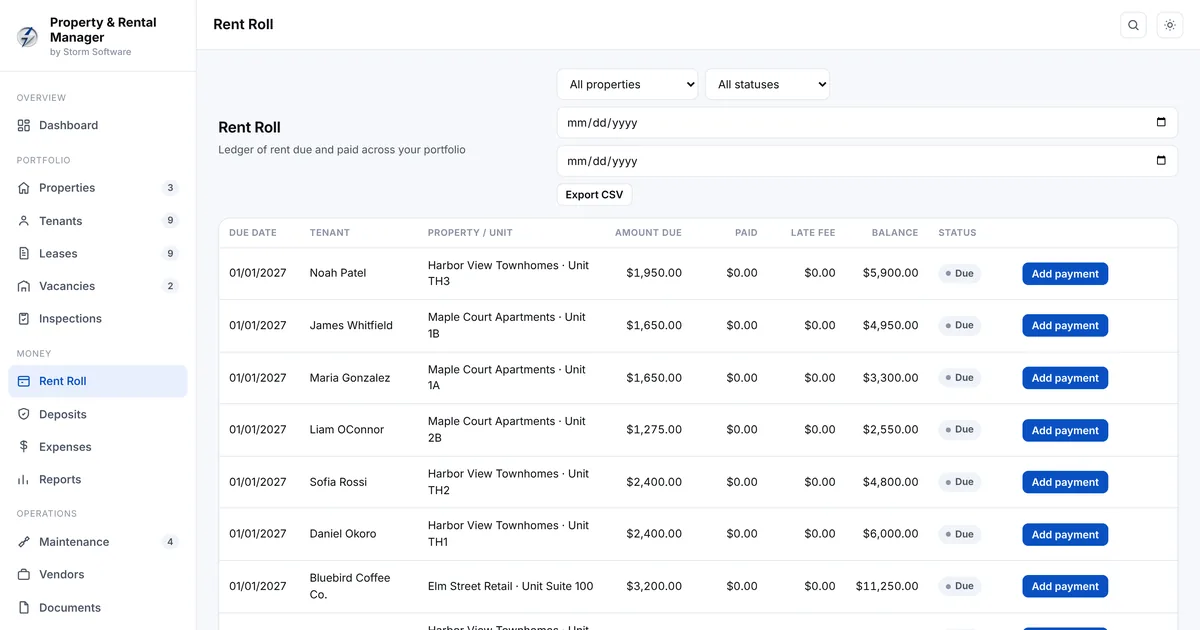
Most landlords start with a rent roll spreadsheet. It is free, it is flexible and it works fine for a duplex. Somewhere between three and ten units it starts to slip: a late payment goes unnoticed, a lease renews on old terms, or a deposit deduction cannot be explained at move-out. This guide covers what a rent roll should track, the warning signs that a spreadsheet is no longer enough, and how to choose landlord software without signing up for another monthly bill.
What a rent roll actually needs to track
A rent roll is the list of every unit you own, who lives there and what they owe. A useful one goes further than names and amounts. At a minimum, each unit should show the tenant, the lease start and end dates, monthly rent, the due date, the security deposit held, the balance owed and the date of the last payment.
The harder part is history. A single cell that says a tenant owes $450 does not tell you whether that is one missed month, three partial payments or a late fee you added in error. When a dispute comes up, the ledger behind the number matters more than the number itself.
- Unit, tenant and contact details
- Lease start, end and renewal date
- Rent, due date and late fee rules
- Security deposit held and any deductions
- A payment ledger per tenant, not just a balance
- Notes on repairs, inspections and communication
Five signs your spreadsheet is costing you money
Spreadsheets rarely fail all at once. They fail quietly, one forgotten row at a time. These are the most common signs it is time to move on.
- You find out a tenant is late when you check, not when it happens
- Lease renewals slip past their date and roll over on old rent
- You cannot produce a clean ledger when a tenant disputes a charge
- Repairs live in your phone, your email and your memory
- Tax time means rebuilding a year of income and expenses from scratch
What landlord software should do for you
Good property management software turns the rent roll into a working system. Rent is marked paid, partial or late automatically. Late fees follow your own rules. Leases warn you well before they expire. Deposits are tracked from the day they are received to the day they are refunded or deducted.
It should also cover the work around the rent: maintenance requests from report to fixed, move-in and move-out inspections, vacancies and applicants, and expenses per property. At the end of the year you want income, expenses and net income by property, plus a summary your accountant can work from.
Storm Rentals was built around exactly this list. See the rental property management software for the full feature set.
Cloud landlord apps vs one-time software
Most landlord apps are cloud subscriptions, typically priced per month and often per unit. That makes sense if you need online rent collection or a tenant portal. It makes less sense if you collect rent by bank transfer and mainly need a clear, reliable record.
With cloud software you pay every month for as long as you own property, your tenant records live on someone else's server, and prices tend to rise at renewal. One-time software runs on your own computer, keeps your records private and costs the same whether you use it for one year or ten. The trade-off is that you are responsible for backups, and the data does not sync to your phone automatically.
- Choose cloud if you need online payments, a tenant portal or several people working from different locations
- Choose one-time software if you want private records, no monthly fees and you work from one main computer
How to move from a spreadsheet in an afternoon
Switching does not have to be a project. Start with your properties and units, then add current tenants and their lease terms. Enter the deposit you hold for each tenant and their current balance as an opening figure. You do not need to re-enter years of history; start the ledger from this month and keep the old spreadsheet as an archive.
Once the basics are in, set your late fee rules and lease renewal reminders. From then on, record each payment as it arrives. Within a month you will have a rent roll that updates itself and a ledger for every tenant.
Keeping records that hold up in a dispute
Deposit disputes are where landlords most often lose money. The fix is boring but effective: a dated move-in inspection with photos, a dated move-out inspection, and a deposit record that lists every deduction with a reason. Software that ties inspections, repairs and deposit deductions to the same tenant makes this far easier.
Rules on deposits, notice periods and late fees differ by state and country, so check the rules where your property is. A good system helps you follow them consistently; it does not replace knowing them.
Common questions
Is a rent roll the same as a tenant ledger? No. The rent roll is the summary of every unit and what each tenant owes. The tenant ledger is the detailed history behind one tenant's balance: every charge, payment and adjustment. You need both.
How many units can a spreadsheet handle? There is no hard limit, but most landlords feel the strain somewhere between five and ten units, or as soon as more than one person updates the file.
Do I need software for one property? Usually not. If you have a single unit, a clear spreadsheet, a calendar reminder for the lease end and a folder for receipts is enough. Software earns its place once there are several leases, deposits and repair jobs to keep straight.
The bottom line
If you own one or two units and never miss a renewal, a spreadsheet is fine. Once you are juggling several leases, deposits and repairs, the cost of one missed late payment or one lost deposit dispute is higher than the cost of proper software. Pick a tool that tracks rent, leases, deposits and repairs together, and that you can afford to keep for as long as you own property.
If you would rather pay once than monthly, Storm Rentals is $99 once and works offline on your own computer.
For more on keeping expenses and income straight, read our guide to budgeting without a subscription.
You may also like: Storm Contracts, Storm Budget, Storm Legal