
Construction Pay Applications Explained: G702 and G703 Style Billing
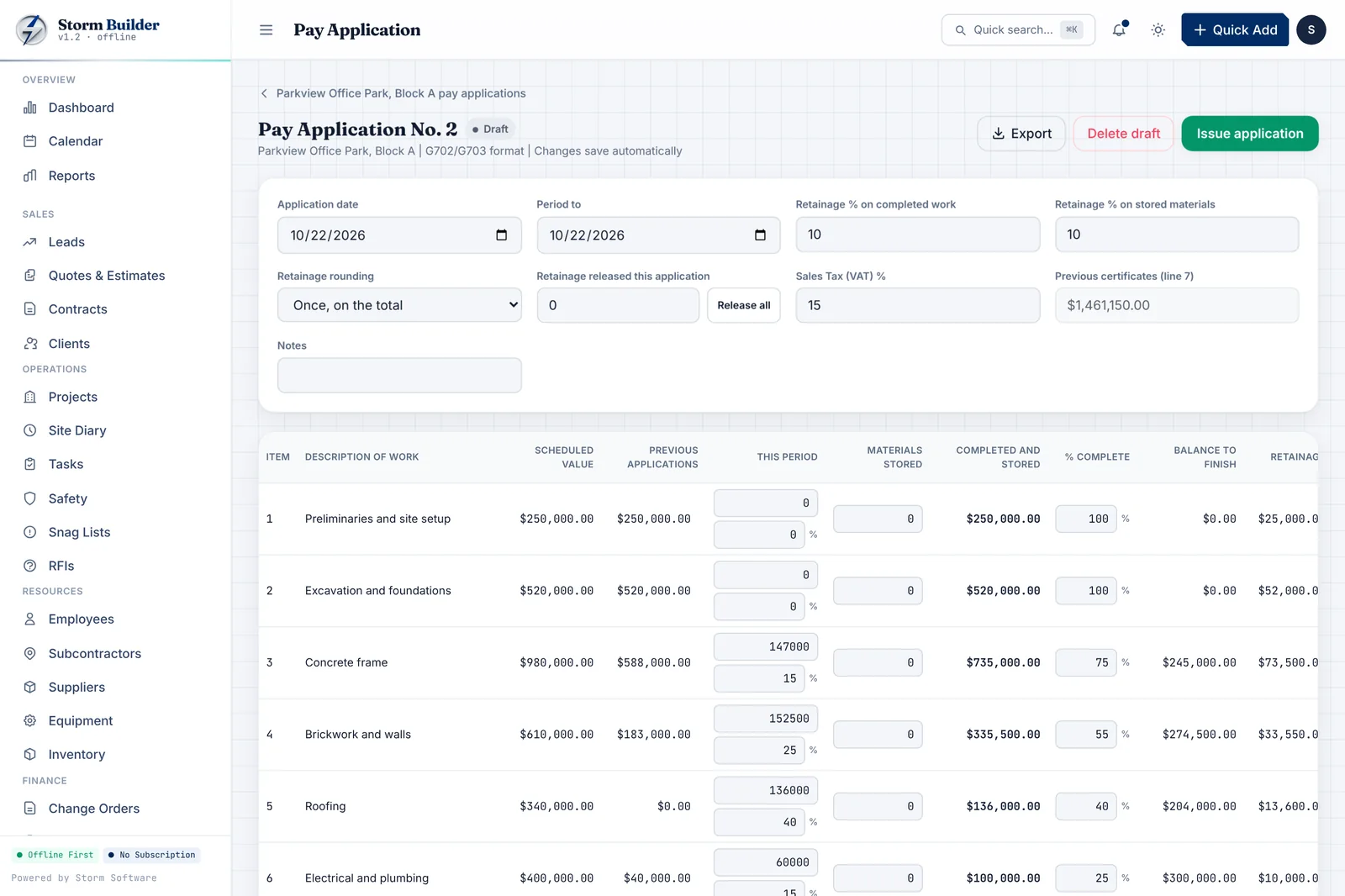
On most commercial and many residential jobs, contractors are paid through progress billing: a pay application each month for the work completed so far. In the US, the most familiar format is the AIA G702 application summary with a G703 continuation sheet. The maths is not hard, but it has to be exact, and it has to carry forward correctly from one month to the next. This guide explains how the pieces fit together.
Start with the schedule of values
The schedule of values breaks the contract sum into line items, such as site work, concrete, framing, electrical and finishes, each with its scheduled value. Every pay application bills progress against these lines. A well-built schedule of values makes every later application easier, so take the time to get it right at the start.
The continuation sheet: line by line progress
The G703 style continuation sheet lists every line in the schedule of values. For each line it shows the scheduled value, work completed in previous applications, work completed this period, materials presently stored, the total completed and stored to date, the percentage complete, the balance to finish and the retainage on that line.
The key rule is that previous work always carries forward. This month's 'from previous application' column must match last month's 'total completed' column exactly.
- Scheduled value
- Work completed: previous and this period
- Materials presently stored
- Total completed and stored to date, and percentage
- Balance to finish
- Retainage
The application summary: what is due now
The G702 style summary rolls the continuation sheet up into one page. It starts with the original contract sum, adds net change orders to get the contract sum to date, then shows total completed and stored to date, less retainage, less previous certificates for payment. What remains is the current payment due.
How retainage works
Retainage is a percentage of each payment, often 5% to 10%, that the owner holds back until the job is substantially complete. It protects the owner against defects and unfinished work. Your contract decides the rate, when it can be reduced and how it is released. Track it carefully; it is often a large sum by the end of a project, and rounding per line versus on the total can change the figure by a few cents.
Change orders and the contract sum
Approved change orders change the contract sum and usually add lines or values to the schedule. They should flow into the next application automatically, so the summary always reflects the current contract. Pending or unapproved changes should be tracked separately and never billed until approved.
Job costing: are you actually making money?
Billing correctly is only half the picture. The other half is knowing what each job costs you. Job costing compares the budget for each project with actual costs as they happen: materials, subcontractors, equipment and labour. Seeing variance early, while the job is still running, is what lets you fix a problem before it eats the margin.
Labour is usually the hardest cost to track. Timesheets that allocate each worker's hours, including overtime, to the jobs they worked on give you a true labour cost per project. Combined with your billing, you can see contract sum, cost to date, profit and remaining to bill for every job in one view.
Common mistakes that delay payment
Most rejected pay applications fail for simple reasons. Catching them before you submit saves weeks of waiting.
- Previous work that does not match the last approved application
- Unapproved change orders included in the contract sum
- Retainage calculated at the wrong rate or rounded inconsistently
- Percentages over 100% on a line
- Stored materials billed without the supporting documents your contract requires
Software that does the maths for you
Spreadsheets can produce pay applications, but one broken formula carries forward into every month after it. Construction billing software can build the schedule of values once, carry previous work forward automatically, calculate retainage and the current payment due, and lock each application once issued. It should also let you check figures from your own G702 or G703 against its calculation.
Storm Builder produces AIA-style pay applications, change orders, job costing and more for $99 once. See the construction management software.
For everyday invoices outside progress billing, see our guide to invoicing software.
A short walk-through
Imagine a $500,000 contract with 10% retainage. Last month's application showed $120,000 completed. This month you complete another $80,000 of work and have $10,000 of materials stored on site. Total completed and stored to date is $210,000. Retainage at 10% is $21,000, leaving $189,000 earned less retainage. Subtract the previous certificate of $108,000 (last month's $120,000 less its 10% retainage) and the current payment due is $81,000.
Common questions
Can I bill for stored materials? Many contracts allow it, usually with proof of purchase, insurance and secure storage. Check your contract before including them.
When is retainage released? Typically at substantial or final completion, according to your contract. Some contracts reduce the rate once the project is half complete.
What if the owner changes a line amount? Agree the change in writing and process it as a change order so the schedule of values and contract sum stay accurate.
A note on forms and advice
AIA, G702 and G703 are trademarks of the American Institute of Architects. This guide describes the general format of progress billing and is not accounting, tax or legal advice. Always follow the terms of your contract and check figures with your accountant.
You may also like: Storm Contracts, Storm Mechanics, Storm Legal